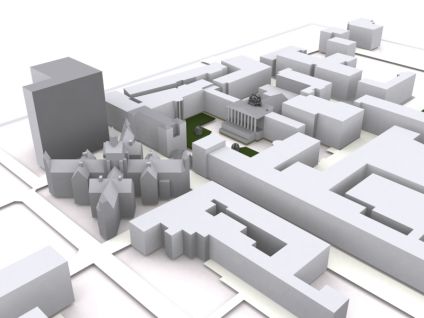
Rendering 3D models can be over complicated, our favorite technique is the quick and easy 'Clay' render using 3DMax.The image above was created in SketchUp and then simply imported into Max using the .3ds export.
Once in Max take these simple steps to produce a image similar to the one above:
1) Add a 'Skylight' to the scene (click lighting, select a Skylight and click in your scene).The Skylight can be placed anywhere as is not a direct lighting component.
2) Hit F10 to bring up the Render Dialog and select the 'Advanced Lighting' tab, now click 'LightTracer'
3) Render your scene.
That's it, a quick and simple render that we often use for our images.
Clay Rendering in 3DMax
Andy
CASA, UCL East
Recent
The Papers: The 2nd Album
Spatial Computing and the Phygital City: Towards Digital Habitation
Color Weather: A Data Watch Face for the Pebble Time 2
Fenland: A weeWX Dashboard with forecast verification, ensemble models, climate records back to 1940 and finally, that tween...
City Clock: A City where the People Tell the Time