It's an exciting time to be a Pebble fan. After years of being kept alive by the dedicated Rebble community, the Pebble is officially back. The new Pebble 2 Duo watches (the black-and-white model) are officially shipping to the first backers, with the high-resolution color Pebble Time 2 set to follow.
So, I decided to make one myself.
Introducing 'Just Weather'
I wanted a face that was clean, digital, and gave me all the key data at a glance, formatted to look great on the 144x168 screen of the Pebble 2. I call it "Just Weather."
It uses the free Open-Meteo API to pull in a ton of useful, hyperlocal data right to your wrist:
-
- Current Location (from your phone's GPS)
- Temperature
- Current Conditions ("Partly Cloudy," "Rain," etc.)
- Barometric Pressure & 3-Hour Trend
- Wind Speed & Precipitation
- ...and of course, the time!
Built with GitHub CoPiliot
The best part is that the new Pebble development workflow is incredibly modern. I was able to build this using the CloudPebble IDE, which now integrates directly with VS Code in the browser.
This meant I could use the emerging tools like GitHub Copilot to help generate the code and work through the trickiest parts—like making direct HTTPS requests to the weather API, which (after a lot of testing!) we proved is possible from the phone app.
After getting the data, the final step was tweaking the C code to make sure the layout wasn't clipped and all the information fit perfectly on the 144x168 screen. It's now compatible with watches in the Pebble family, from the original Pebble Time (color) to the new Pebble 2 Duo and the upcoming Pebble Time 2.
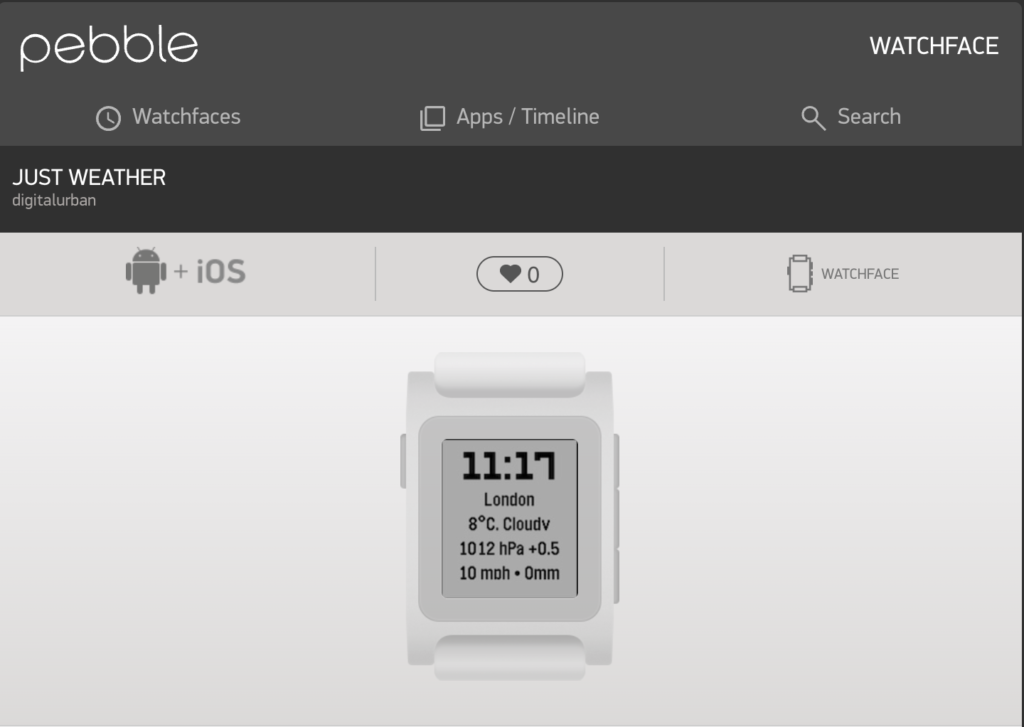
Available Now
This project took around 6 hours, with the main issue being that Co-Pilot did not know how to get HTTP requests - it took me down a lot of rabbit holes, and in the end, it was down to using a simpler call on the data - XMLHttpRequest. Once this worked it all fell into place and it was simply a case of asking Copilot to add in the data fields, do the geocoding and then take a step back and explain how the code actually works.
If you're like me and just want a simple, data-rich weather face, please give it a try...
-
- Download 'Just Weather' from the Rebble Appstore
- Check out the source code on GitHub for the latest updates - now includes its own settings page (its become a proper watch face app)...